Location of the power switch
This article shows the location of the power switch of the Lexmark 2500+ Series Dot Matrix printers.
Overview
Lexmark made some changes regarding the power switch of the new Lexmark 2580+, 2581+, 2590+, 2591+ Dot Matrix or Impact Printers. These printers automatically power up once plugged into a power source. This document points the button used to power down these machines.
New power button
In order to meet some requirements in energy regulations, the new Lexmark 2500+ Dot Matrix printers do not come with a power switch by design.
In these models, the
Start/Stop
(green) button on the front panel basically functions as the power switch. See the following front panel illustration.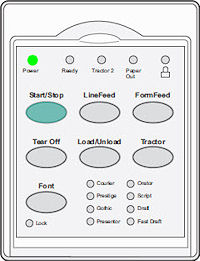 | 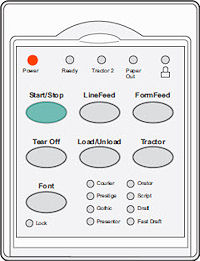 |
The printer’s Start/Stop button serves as the new power switch. The printer is in Ready mode if the Power LED is green . On the other hand, an orange/amber color represents the printer in power down mode. |
To power down the printer, simply hold the
Start/Stop
button for five seconds. In actuality the printer will still have one LED lit which is an orange/amber color. The printer in this mode is consuming less than (<) 1/2 watt of power.LEGACY ID:
FA854