31 Defective Print Cartridge error caused by a loose wiring cable
"31 Defective Print Cartridge" Error Caused by a Loose Wiring Cable on a Lexmark T640, T642, or T644 Printer
Check the toner cartridge first
In most cases, the toner cartridge will be the cause of
31 Defective Cartridge
errors. Please check the toner cartridge before
checking the cable. Check for a loose cable on the system board
If you cannot clear the error after checking or replacing the toner cartridge, a small cable inside the printer may have come loose. You can check this by following the instructions in the table below.
NOTE:
You will need a Phillips head screwdriver to perform this operation. This is considered a customer-level procedure. However if you feel uncomfortable carrying out these steps, please contact Lexmark Technical Support
for assistance. See Contacting Lexmark
at the end of this document for more information.- Power off the printer.
- Unplug the printer's power cord from the wall.
- Access the printer's main system board.
- Open the lower and upper front covers.

- Open the left side cover.NOTE:You can remove the left side cover if needed. To do this, open the cover as far back as it will go and carefully remove it by pulling towards the back. Do NOT force the cover if it does not yield easily.
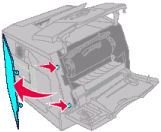
- Using a screwdriver,loosenthe six screws holding the metal system board cover in place.NOTE:Do not remove the screws. This will reduce the chances of a screw getting lost.
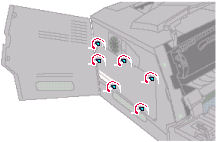
- Slide the system board cover forward and remove the cover.
- You will see many small wire cables on the system board. Look for a two-wire cable (one white wire, one black wire) going into a dark-blue plug/connector labeledCART. (See the images below.) This cable controls the operation of the toner cartridge. The blue connector may be loose.
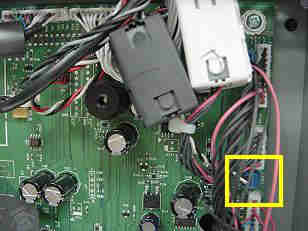
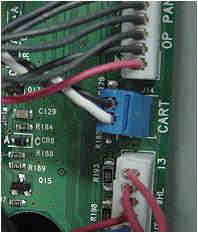
- Carefully push in on the blue connector and make sure it is fully plugged in.
- Reinstall the system board cover and tighten the screws holding the system board cover in place.
- Place the left side cover back on and close the upper and lower front covers.
- Plug the printer power cord back in and power the printer on.
- If the printer comes up to theReadystatus, try printing again.
- If theDefective Cartridgeerror persists, the blue connector or its wires may be damaged. The printer will require service to fix this issue. Please contact a local servicer or Lexmark Technical Support for more information.
Contacting Lexmark
If suggestions resolve of the above the issue, please contact
Lexmark Technical Support or a local authorized service provider for additional assistance. When calling Lexmark Technical Support for service, please be prepared to describe the problem you are experiencing or the error message on the display.
LEGACY ID:
SO3836