Top causes of common
paper jams
This article provides information on the most likely causes of various paper jams that might occur on Lexmark T64x and T65x series printers.
Purpose
This article provides information on the most likely causes
of various paper jams that might occur on Lexmark T64x and T65x series
printers.
Input paper jams
Dirty or worn pick rollers in the paper trays cause most input
jams. An error code of
24x
(where x
can be any number) typically accompanies input
jams. If you are experiencing frequent input jams, clean the pick
rollers by following the instructions below.- Turn off the printer and then remove all the paper trays.
- Locate the pick rollers, which are inside of the area where the trays insert into the printer.NOTE:Each paper tray has its own pick rollers.
- Carefully lower the pick-arm assembly so you are able to access the rollers.
- Clean each roller by using an alcohol swab or damp cloth to wipe around each roller's flat outside surface.NOTE:The rollers are clean when there is no more visible toner or paper dust, and when the surface feels slightly sticky if you rub your finger across it.
- Allow two minutes for the rollers to completely dry and then reinsert the paper trays.
- Turn the printer back on and run a few test prints.
NOTE:
The pick rollers are considered
a consumable item because they will wear and therefore need to be
replaced periodically. Accordingly, if cleaning the pick rollers does
not correct the paper jam issue, please contact Lexmark to order a
new set of pick rollers. Use the part number 40X4308
for printer models Lexmark T64x and Lexmark X64x series, as well
as Lexmark T65x and Lexmark X65x Series. Internal paper jams
Internal paper jams occur in the middle of the paper path.
Internal jams are typically accompanied by an error code of
200
or 201
. As they
can have multiple causes, internal jams are more difficult to evaluate
than input jams. The most common causes of internal jams include: - Improper pick from one of the paper trays (typically causes a200 Paper Jammessage).
- An input sensor that is damaged or sticking due to contamination (typically causes a200 Paper Jammessage).
- A damaged surface on the bottom of the toner cartridge, causing the paper to catch on it (can cause a200or a201 Paper Jammessage).NOTE:Replacing the cartridge should correct this issue.
- A damaged surface on the fuser input guide (typically causes a201 Paper Jammessage).
- A broken fuser exit sensor (typically causes a201 Paper Jammessage).NOTE:In this instance, the paper (media) will have been drawn into and partially past the fuser before stopping. This will typically require replacement of the fuser or the fuser exit sensor.
Exit paper jams
Exit paper jams occur in the back of the printer. Exit jams
are typically accompanied by an error code of
202
. They occur either in the fuser assembly or in the rear exit assembly,
called the redrive, of the printer. The most common causes of exit
jams include:- Use of non-Lexmark toner.NOTE:Using such third-party toner may contaminate a Lexmark printer or damage its fuser (see the note below for more information).
- A worn fuser assembly.
- The rear door of the printer is partially open.
- The printer is pushed tightly against the wall, which causes the paper to catch on the printer's rear door.
- Dirty rollers in the redrive assembly.
- Not using or installing the correct fuser wiper when printing on label media.
NOTE:
The fuser assembly is a
consumable (or wear item) that needs to be replaced periodically.
Under typical printing conditions, the fuser assembly should be replaced
at 300,000-page intervals. However, different environments and media
types may shorten this work life. Most notably, the use of label media
(such as prescription labels used in pharmacies) will dramatically
shorten the fuser life for several reasons, which can include contamination
from the label adhesive. Additionally, Lexmark does not support the use of third-party
toner cartridges. The chemicals often found in non-Lexmark toner may
attack and degrade the coating on the fuser hot roller. Over time,
this can create print quality or paper jam issues. Once the coating
on the fuser hot roller is damaged, the fuser assembly will need to
be replaced. In addition, the effects are often latent and may occur
long after the third-party toner is no longer in use.
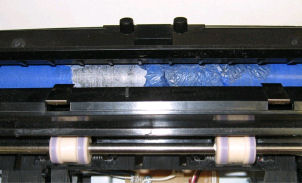
The picture below shows an example of how toner from a third-party
cartridge can damage the coating of the fuser hot roll.
Still need help?
Please contact
Lexmark Technical Support
if you need additional assistance. NOTE:
When calling for support, you will be asked for your machine/model type
and serial number
(SN
).Please call from near the printer in case the technician on
the phone asks you to perform a task involving the printer.
LEGACY ID:
SO4538