Incorrect and Unreadable Maxicode Barcodes in SAP (Oct. '11)
What you will see
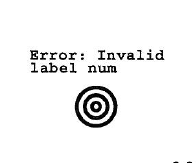
Incorrect print output and the inability to read SAP-generated Maxicode bar codes:
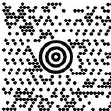
Or:
What happens
When you try to modify the
output
character set
of the device type
, you redefine the output code of a special character with non-printable information that is not
applicable
to the required hexadecimal code.Hence, extra characters in the non-printable ASCII range are printed due to SAP filtering by the SAP kernel.
NOTE:
This is only possible if the redefined character does not occur as "normal" printable text during the output of the bar code label or form. Should this be the case, the character will not be issued correctly after the modification.
Suggested Remedy
SAP AG recommends the following solution in an effort to output the hexadecimal code in a bar code contained within a SAP script.
Example using the '#' character
with the font "ÿ" (
dieresis*)
* ( ¨ ) placed over the second of two adjacent vowels or over a vowel at then end of a word to indicate the vowel should be sounded out, e.g.,
rontë.
naïve or B
Device type used
| Output character set of LB_UBI
|
LB_UBI | 1117 |
Possible solutions
- The SAP character "ydieresis"("ÿ"), SAP number 365, has the hexadecimal codeFFin codepage 1117. It does not occur as normal text in the form and can, therefore, be redefined.
- Up toBasis Release 4.6D:
- In transaction SPAD:Copycodepage 1117to codepage 9117.
As of
Basis Release 6.10
:- In transaction SCP:Copycodepage 1117to codepage 9117.
- Up toBasis Release 4.6D:
- In transaction SPAD:Editcodepage 9117, change thehexadecimalcode forSAP character 365 (ydieresis)fromFFto1D. Save the code page.
As of
Basis Release 6.10
:- In transaction SCP:Editcodepage 9117, change thehexadecimalcode forcharacter "U+00FF"fromFFto1D. Save the code page.
- In transaction SPAD:CopytheLB_UBIdevice typetoZLB_UBI. Edit ZLB_UBI,replacethe three entries of code page 1117 with the entries in code page 9117, andthen savethe device type.
- In transaction SPAD: For the output device used (that is, the printer on which the bar code is printed),replacetheLB_UBIdevice type with theZLB_UBIdevice type that you have just created.
- In transaction SE71: In the SAPscript form,enterthe special characterydieresis ("ÿ")at the position in the bar code datawhere the value 0x1Dis to be output. To enter special characters, you may use the "Include-Characters-Printable characters" function in the SAPscript editor.
S
till Need Help?
If you require additional assistance, please contact SAP or see Contact information below.
NOTE:
When calling for support, you will need your printer model/machine type
and serial number (SN)
.
Please be near the products described in this article to expedite the support process and reduce call-back situations.
LEGACY ID:
SO6848