How to Disable E-mail Reports in Education Station
Procedure
- Navigate to the Lexmark Management Console (LMC), which is located athttp://(HOSTNAME):9780/lmc/where (HOSTNAME) is replaced with the FQDN (hostname) of your Education Station server.
- Click on theSolutionstab.
- Click onEducationStationin Box 1 (Solutions).
- Click onConfigurationin Box 2 (Tasks).
- Uncheck theE-mail Reportsoption.
- Click theApplybutton to save the settings.
Illustration
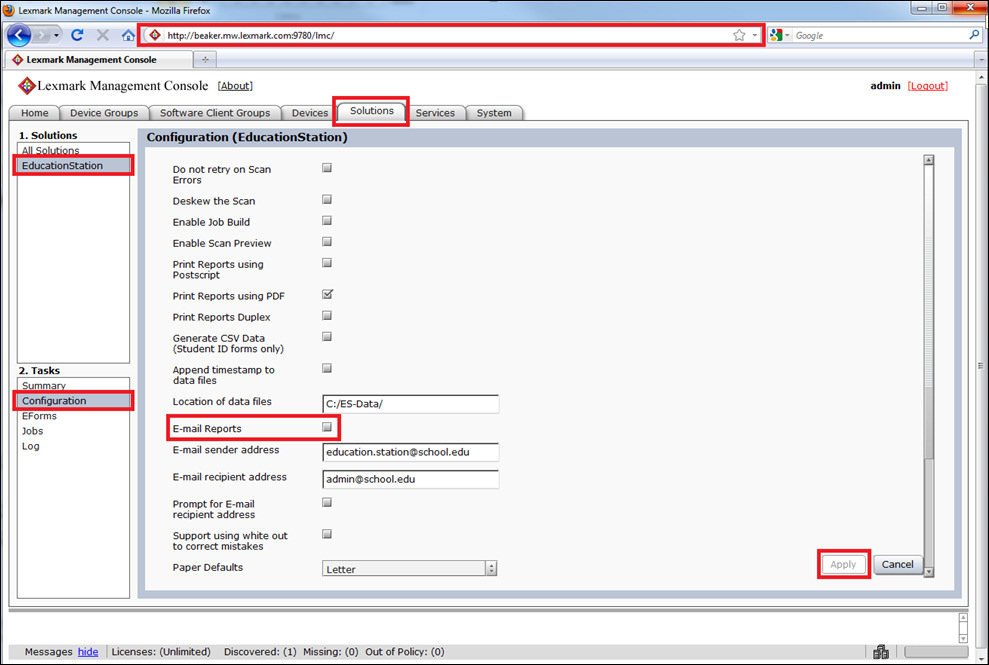
Click image to enlarge it.
Still need help?
Contact Lexmark Technical Support or your local Lexmark representative if you require additional technical support.
NOTE:
You will need to provide your printer model/machine type
and serial number
(SN
) when calling for support.
Please call from a computer that can access the Lexmark Management Console in case the technician on the phone asks you to perform a task involving an application function.
LEGACY ID:
HO3701