Blocked Ports and Processes Affecting MarkVision's Ability to Communicate over a Network
This article describes the
ports and protocols
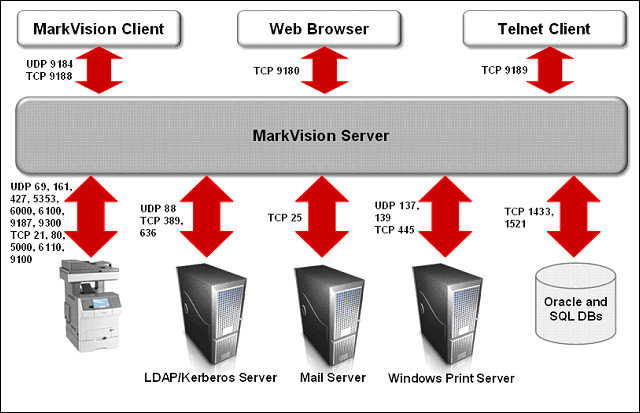
used by MarkVision™ Professional (MVP). Any network firewall blocking these ports between any MVP version server and a client/remote device will break basic functionality, such as discovery, policies, job accounting, etc.Identify the failing communication path for MVP and consult or contact your firewall provider or manufacturer for additional troubleshooting assistance.
Protocol
| MarkVision Server
| Device
| Used For
|
Network Printer Alliance Protocol (NPAP)
| Ephemeral UDP port | UDP 9300
| Communication with Lexmark network printers |
XML Network Transport (Object Store) (XMLNT)
| Ephemeral UDP and TCP ports | UDP 6000
TCP 5000
| Communication with Lexmark network printers |
Lexmark Secure Transport (LST)
| UDP 6100Ephemeral TCP port (handshaking) | UDP 6100
TCP 6110 (handshaking)
| Encrypted communication with Lexmark network printers |
Multicast DNS (
mDNS)
| Ephemeral UDP port | UDP 5353
| Discovery of certain Lexmark network printers and determining the security capabilities of devices |
Simple Network Management Protocol (SNMP)
| Ephemeral UDP port | UDP 161
| Discovery of and communication with Lexmark and third-party network printers |
File Transfer Protocol (FTP)
| Ephemeral TCP port | TCP 21
| Generic file download |
Trivial File Transfer Protocol (TFTP)
| Ephemeral UDP port | UDP 69
| Firmware upgrades and generic file download |
Hypertext Transfer Protocol (HTTP)
| Ephemeral TCP port | TCP 80
| Generic file download |
Raw
Print
Port
| Ephemeral TCP port | TCP 9100
| Generic file download |
Service Location Protocol (SLP)
| UDP 427 | UDP 427
| Server-initiated device discovery |
Protocol
| Device
| MarkVision Server
| Used for
|
Network Printer Alliance Protocol (NPAP) | UDP 9300
| Ephemeral UDP port | Generating alerts and performing the required processing |
Service Location Protocol SLP | Ephemeral UDP Port | UDP 427
| Asynchronous device discovery |
Protocol
| MarkVision Server
| Database
| Used for
|
N/A | Ephemeral TCP port | TCP 1521
| (Oracle) Writing data to an Oracle database |
N/A | Ephemeral TCP port | TCP 1433
| (SQLServer) Writing data to an SQL Server database |
Communication between clients and the MarkVision Server is based on
Java RMI (Remote Method Invocation
) technology. MVP uses randomly selected ports on the server to communicate to devices and MVP leaves the specifics of ports selection to the underlying java virtual machine. This facilitates its multi-threaded functionality.
NOTE:
The initial binding for a client-server session occurs on the 9188
port on the server side. All successive calls are made through Ephemeral ports on either side.MarkVision Client
Protocol
| MarkVision Client
| MarkVision Server
| Used for
|
RMI over TCP Remote Method Invocation over TCP | Ephemeral TCP port | TCP 9188 (Ephemeral port) | Establishing the initial RMI session Afterwards, successive communication is done through Ephemeral ports on both sides |
SLP | Ephemeral UDP port | UDP 9184 (Ephemeral port) | Client discovery of the MarkVision Server |
.
MarkVision Server Web Interface
Protocol
| Browser
| MarkVision Web Server
| Used for
|
Hyper Text Transfer Protocol | Ephemeral TCP port | TCP 9180
| Launching the Web Server and its associated functionality (such as Messenger and the Web Client) |
MarkVision Telnet Client
Protocol
| Telnet Client
| MarkVision Server
| Used For
|
Telnet | Ephemeral TCP port | TCP 9189
| Establishing Telnet sessions with the MarkVision Server |
Protocol
| MarkVision Server
| SMTP Server
| Used For
|
Simple Mail Transfer Protocol (SMTP)
| Ephemeral TCP port | TCP 25
| Providing the e-mail functionality used to receive alerts from devices |
.
Queue Management
Protocol
| MarkVision Server
| Print Server
| Used For
|
Network Basic Input/Output System (Net BIOS)
| Ephemeral TCP and UDP ports |
| Installing drivers and creating queues on a remote computer |
MarkVision Server to LDAP Server Communication
This type of communication is used for user groups and authentication functionality.
Protocol
| MarkVision Server
| LDAP Server
| Used For
|
LDAP
Lightweight Directory Access Protocol | Ephemeral TCP port | TCP 389 (or whatever the LDAP server has been configured to listen to) | Authentication of MVP users using an LDAP server |
LDAPS
Secure Lightweight Directory Access Protocol | Ephemeral TCP port | TCP 636 (SSL) (or whatever the LDAP server has been configured to listen to; for SSL encrypted connections) | Authentication of MVP users using an LDAP server through a secure channel using SSL |
Kerberos
| Ephemeral UDP port | UDP 88 (the default Kerberos Authentication Service port) | Kerberos authentication |
Still Need Help?
Please
Lexmark Technical Support if you need additional assistance.
contact
NOTE:
When calling for support, you will be asked for your machine/model type
and Serial Number
(SN
).Please call from near the printer in case the technician on the phone asks you to perform a task involving the printer.
LEGACY ID:
SO6437