296 Scanner Locked error
`296 Scanner Locked' Error on a Lexmark X73x Multifunction Printer (MFP)
Issue description
The
296
error code implies that the scanner carrier module is locked in its home position. In this status, the machine can still accept print jobs from the computer but you will not be able to scan or copy using the flatbed or the Auto-Document Feeder (ADF
).Solution
Step | Action |
|---|---|
1 | Confirm that the mechanical lock on the flatbed scanner is in the 'unlocked' position. Follow the direction of the red arrow to unlock the scanner.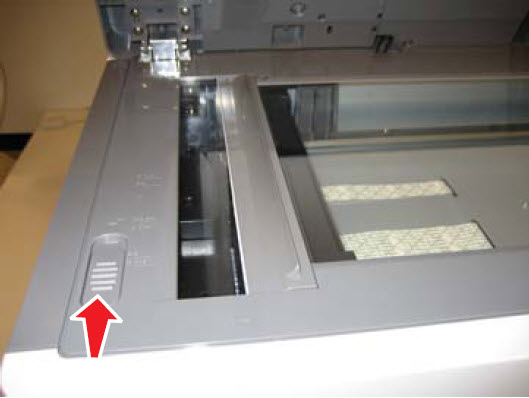 This mechanical lock is designed to protect the scanner module whenever the printer is moved between locations. |
2 | If the error remains or if the scanner still does not respond (even without the error), restart the printer to re‑initialize it. |
3 | Does the error clear? If yes, perform a scan/copy job to verify whether the scanner will respond.
|
LEGACY ID:
TE315