Unable to Login after creating a new Administrator Account with the Markvision Enterprise password utility
Unable to Login After Creating a New Administrator Account with the Markvision Enterprise Password Utility
Issue description
After upgrading from previous versions of Markvision Enterprise to version 4.1.0, new Admin credentials added by the MVE Password Utility (mvepwdutility-windows.exe) cannot be used to login. If the USERS table is examined in the database, newly created users will have what looks to be encrypted “User Name” and “Name” fields.
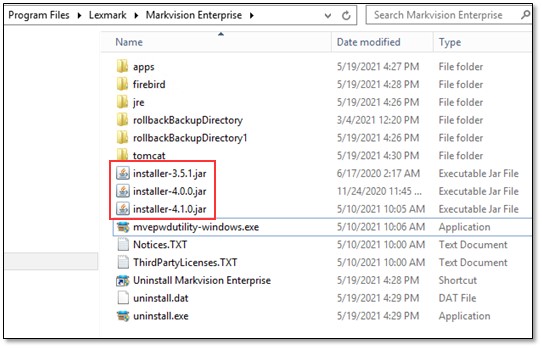
This data corruption is caused by the installer leaving in place older versions of the installer-N.N.N.jar file in the same location as the MVE Password Utility (mvepwdutility-windows.exe).
Affected Products:
Software: Markvision Enterprise 4.1.0
Solution
- Before removing or altering any data in theMarkvision Enterprise installation directory, please ensurea good back-upof the current installation is taken. Refer to the Markvision Enterprise Version 4.1 Administrator's Guide for details on creating a back-up of the application.
- Check the installation directory where themvepwdutility-windows.exeutility is installed for multiple versions of the Installer JAR file. If previous versions of the Installer JAR file exist, manually delete all but the current version. In the example shown, the files installer-3.5.1.jar and installer-4.0.0.jar should be deleted and the file installer-4.1.0.jar should be retained.
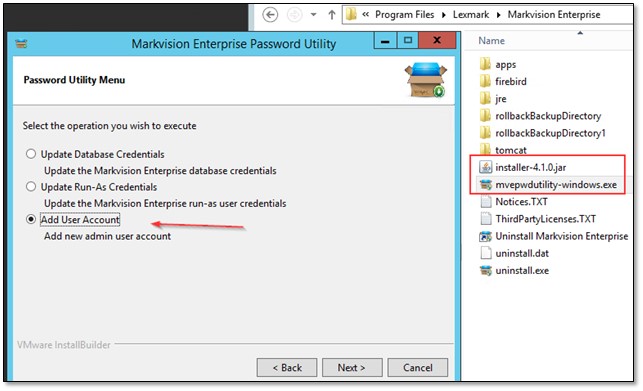
- Once the old files are removed, re-run thePassword Utilityand add anew Admin User.
Additional troubleshooting
In some cases, before logging into the Markvision console, it may be necessary to restart the
MVE service
. To do so, open the Microsoft Windows Services Manager
:- Right-click on theStart buttonto open theMenu.
- SelectRun.
- Typeservices.mscin the Run box, and click theOKbutton.
- Windows Services Managerwill open.
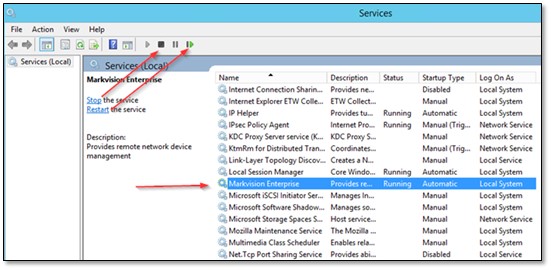
- Locate theMarkvision Enterprise (or MVE) Service, highlight it, then selectStop the servicefollowed byStart the service, orRestart the service.
- Once restarted, wait approximately2-3 minutesfor the server to fully initialize and try to log in again.
LEGACY ID:
SO9052