283.03 scanner jam error message
Lexmark X925 MFP - 283.03 Scanner Jam Error Message
What you will see
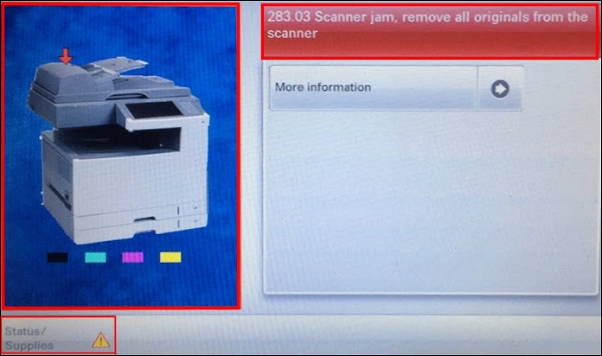
After selecting a scan job, the automatic document feeder (ADF) fails to pick the first sheet, and this error message appears on the touch screen:
"283.03 scanner jam, remove all originals from the scanner"
Troubleshooting
- Open the ADF jam door in case paper is actually jammed in the feeder.
- Remove the pages to be scanned from the ADF.
- ClickMore Informationon the screen.
- Reload the pages into the ADF using the lightest amount of force possible.
- ClickRestart job.
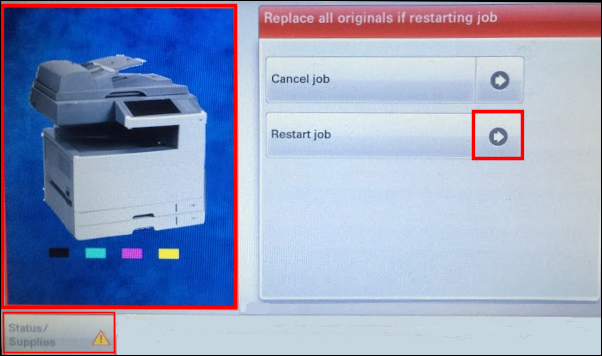
- If the error persists, repeatSteps 1-5.
- Determine whether a legitimate paper feed issue exists and verify paper specifications such as weight, condition, texture, and paper stack height.
- If issue persists,clean the ADF pick rollers.
Example
This video shows an improper paper loading technique and provides an overview of
Steps 1-5
in the troubleshooting section above.Cleaning the ADF pick rollers
Step | Action | Illustration |
1 | Open the ADF cover. | 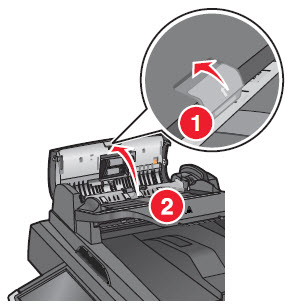 |
2 | Remove the pick roller assembly. | 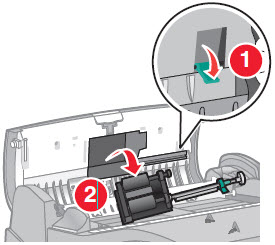 |
3 | Wipe the surface of both pick rollers. Recommended: Useisopropyl alcohol (IPA ) and provide ample drying time. | No Image |
4 | Reinsert the pick roller assembly. | 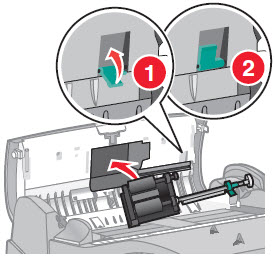 |
5 | Close the ADF cover. | 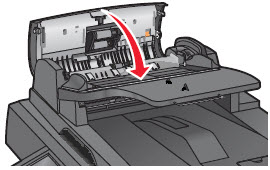 |
If the issue persists, search for more information related to this issue or contact support for further assistance.
LEGACY ID:
TE732