Image printed on duplex pages is skewed or crooked
The Image Printed on Duplex Pages Is Skewed or Crooked when Printing on a Lexmark C792/X792 Printer/MFP
Overview
In duplex (both sides of page) mode printing, when the other side of the page is skewed, tilted or crooked, the printer may be using an out-of-specification media, or the left side door may not be fully closed.
Troubleshooting
- Check to see if the media being used is supported on the printer. Click here to review the media specifications for this printer.
- Ensure that the skew happens only when printing in duplex (printing two-sided). To do this, print first in simplex (single-sided) and check the output.• If the output in simplex (single-side printing) is also skewed, check whether the paper is being properly loaded into the tray. Ensure that the paper guides are snug against the paper. The media can skew if the guides are too tight or too loose. If necessary, refer to the printer’sService Manualfor more detailed information in troubleshooting skew issues.• If the simplex output does not skew, proceed to the next step.
- Check whether the left side door is fully closed. See the images below for comparison.Note:Click on the images to enlarge.Door Not Fully ClosedDoor Fully Closed
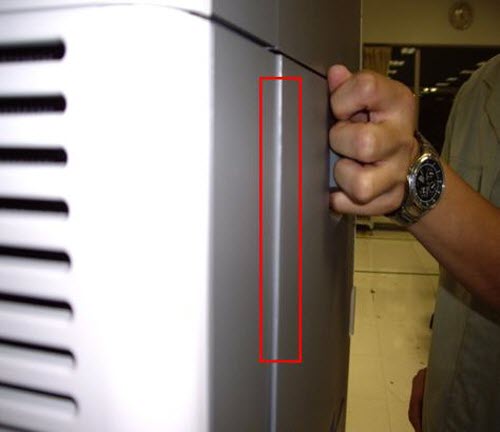
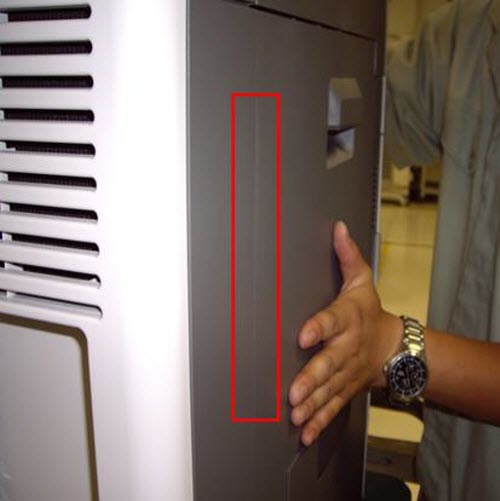 View from the rear of the printer looking forwards. Note the portion of the left door (boxed inredabove) that protrudes when not fully closed.
If the issue persists, search for more information related to this issue or contact support for further assistance.
LEGACY ID:
SO6386