Remote Operator Panel Fails to Display Contents When Triggered via the Embedded Web Server
What you will see
When you open the embedded web server and launch the included 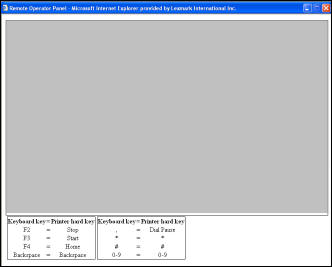 What you should see:
Remote Operator Panel
, a gray screen appears.Illustration
- -The initialization of SUN's JAVA plug-in.
- -AVNC Authentication Page, and
- -a correspondingClick here to continuebutton.
Explanation
The example above depicts the behavior of Sun's Java plug-in
Version 6 Update 3
. Suggested Fix
The remote operator panel applet requires Sun's Java
Version 6 Update 10
. Follow the steps below to check your Java version number and update.- Right-click on the Java status notification icon.*Illustration
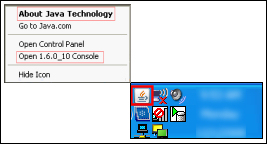
- Click onAbout Java Technology.
- If the version i s below1.6.0_10-b33, click onGo to Java.comor onOpen Control Panel.
- Click on theUpdatetab.
- Click on theUpdate Nowbutton.
- When the update procedure has completed, try to reopen theRemote Operator Panel.*If Java is not present on the computer, the notification icon will not appear and you will need to download the latest version from Sun at www.Java.com. If you have additional questions about Sun's Java platform, visit www.java.com/en/download/help/. If preferred, you can select a different language at the bottom of the web page.
Contacting Lexmark
If you need additional assist
ance, please contact Lexmark Technical Support.
NOTE:
When calling for support you will need your printer machine/model type
and serial number
. Please call from near the computer and printer in case the technician requires you to perform a task on one of these devices.
LEGACY ID:
SO4643
- Infoprint 1850 MFP-----------------------------------------------------------------------------Infoprint 1860 MFP-----------------------------------------------------------------------------Infoprint 1870 MFP-----------------------------------------------------------------------------Infoprint 1880 MFP