Close Door or Insert Toner Cartridge message
A 'Close Door or Insert Toner Cartridge' Message Is Displayed on a Lexmark T650, T652, or T654 Series Printer
Issue description
The printer is asking you to close a door or insert the toner cartridge.
The 'door' referred to in the error message is the upper front cover.
Solution
Step | Action |
|---|---|
1 | Power off the printer. |
2 | Open the upper front cover and remove the toner cartridge. 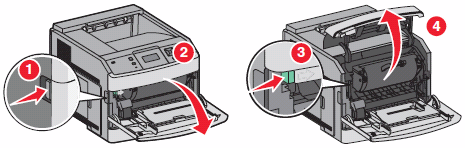 |
3 | Look inside the printer. Confirm there is no paper or other obstructions that would prevent the toner cartridge from installing completely. |
4 | Once you confirm that the inside of the printer is clear, check the toner cartridge. Confirm that the toner cartridge is not damaged. Pay close attention to a tab located on the left side of the toner cartridge. (See the images below.) This tab connects to the 'cover open' sensor. If yo u find this tab broken or damaged, test the printer with another toner cartridge. If this second cartridge corrects the issue, then replace the cartridge that has the broken tab. NOTE: Lexmark does not replace or provide warranty on toner cartridges manufactured by a third party, nor Lexmark cartridges that have been refilled or reworked by any company other than Lexmark. If a third-party cartridge is causing this issue, contact the point of purchase to have the cartridge replaced. Likewise, if the toner cartridge is a Lexmark cartridge that any company other than Lexmark has refilled or refurbished, contact the place where the cartridge was refilled to have it replaced.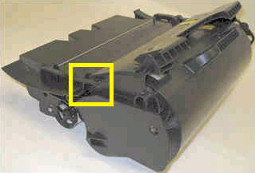 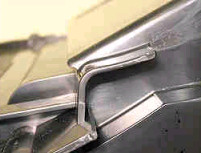 |
5 | If the toner cartridge appears to be fine, reinstall the toner cartridge. Confirm that the cartridge is installed fully. |
6 | Close the upper front cover and power on the printer. See if the printer comes up to the Ready screen.
|
Service action
Try performing the suggested actions below before replacing parts on the printer. If you cannot get to the printer to test it, replace the
front door sensor
.The front door sensor cannot be ordered as a separate part. To get a replacement front door sensor, you will need to order the
left operator panel hinge assembly
(Part number: 40X4396
)Step | Action |
|---|---|
1 | Check the condition of the toner cartridge before replacing any parts on the printer. Confirm that the tab on the left-hand side of the toner cartridge is not damaged or broken. See the Recommended actions table above for detailed information. |
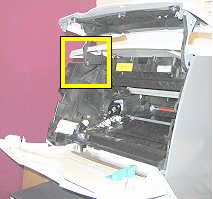
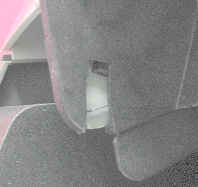
2 | If the toner cartridge appears to be fine, check the condition of the front door sensor. To check this:
|
3 | If possible, test the front door sensor before before sett ing up a service action. To do this:
If the sensor seems to be working correctly, test the printer with another toner cartridge or contact Lexmark Technical Support for additional support. |
4 | If the error continues after continues after replacing the sensor, please contact your next level of support for further assistance. |
LEGACY ID:
SO4787