Defective Cartridge error is displayed on printer control panel
A 'Defective Cartridge' Message Is Displayed on a Lexmark T65x or X65x Model Printer
Issue description
The printer stops printing and displays a '
Defective Cartridge
' message. A 31.xx
numeric error (where 'x
' can be any number) normally accompanies this message; i.e., 31.01
, 31.02
, 31.05
, etc.Solution
Cleaning the cartridge contacts
First try cleaning the contacts on the toner cartridge. Dust on the contacts from either toner or paper can cause a poor connection with the printer and result in a
Defective Cartridge
error. Follow the steps below.Step | Action |
|---|---|
1 | Power off the printer. |
2 | Open the upper front cover. 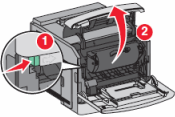 |
3 | Remove the toner cartridge. 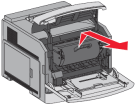 |
4 | Look for a small, green circuit board on the left-hand side of the cartridge. Check it for any damage. If damaged, the toner cartridge likely will need to be replaced. 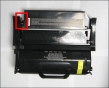 |
5 | If the board is undamaged, locate the contact plates on the board. They should look like two or four gold squares. Use a lint-free, dry cloth to carefully clean off the contacts. 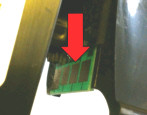 |
6 | Once the contacts are clean, reinsert the toner cartridge. |
7 | Close the upper-front cover and power on the printer. Does the Defective Cartridge message appear?
|
If the error message continues
- Check the set of contacts inside the printer (click here for picture). Confirm that there are no small pieces of paper or other obstructions here. Remove any obstructions that you find.
- Confirm that you are using an original Lexmark brand toner cartridge. A third-party cartridge may not be compatible with the printer. If a third-party cartridge is installed, try an original Lexmark cartridge.If this corrects the issue, you will need to contact the point of purchase for questions about, or replacement of, the cartridge
- Confirm that this toner cartridge has not been refilled or reworked. If it has, try an original Lexmark cartridge. A refilled toner cartridge can trigger this error. If replacement corrects the issue, contact the place where the other cartridge was refilled to have it replaced.
- If the error began as soon as the toner cartridge was installed, or shortly after, then the cartridge may be broken. Follow the steps below to check.
- Power off the printer.
- If you just installed this toner cartridge, reinstall the previous cartridge.If that cartridge is unavailable, try installing another new toner cartridge or borrow one from another printer of the same model.
- Power on the printer again afterStep 2.
- If theDefective Cartridgeerror disappears, the problem probably lies with the toner cartridge.
- If the problem cartridge is an original Lexmark product, first contact the point of purchase and inquire about their replacement policy.
- If they cannot help or if the cartridge was purchased directly from Lexmark, please contact Lexmark using the same contact information you used to order the cartridge.
- If that information is no longer available, contact Lexmark Technical Support. A representative can provide assistance.
LEGACY ID:
TE275