Intermittent garbage printout
Troubleshooting Intermittent Garbage Printing on the Lexmark C950
Issue description
When you print a regular document, the printed information comes out as gibberish and does not make any sense.
Explanation
A possible cause of this issue could be related to the type of binary data contained within these PostScript print jobs. Another possible cause of this issue is print jobs are being detected as PCL5 rather than as PostScript data.
Resolution
- Check the printer’s current firmware (FW). Checking the latest Lexmark printer firmware for steps on how to check the printer's current FW.NOTE:If the firmware is already updated, skip Step 2 and go directly to Step 3.
- Update the printer firmware (FW) to the latest PE Release.Contact Lexmark support for steps on how to acquire the latest FW PE release. After the FW has been downloaded, see this article for steps in updating the FW.
- Perform a test print and check whether the garbage printing still occurs.
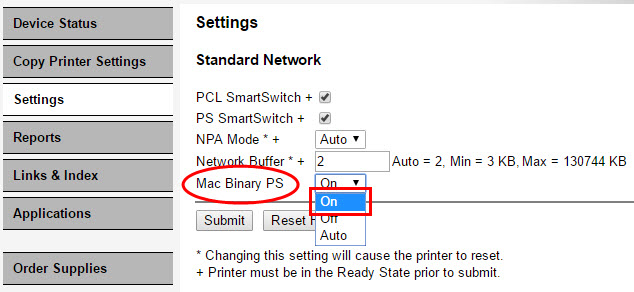
- Access the printer's embedded web server (EWS) and go to:Settings>Network Ports>Standard Network>Mac Binary PS, should the issue persist.
- Change theMac Binary PSsetting fromAutotoOnand clickSubmit. Perform another test and check whether the issue is still present.
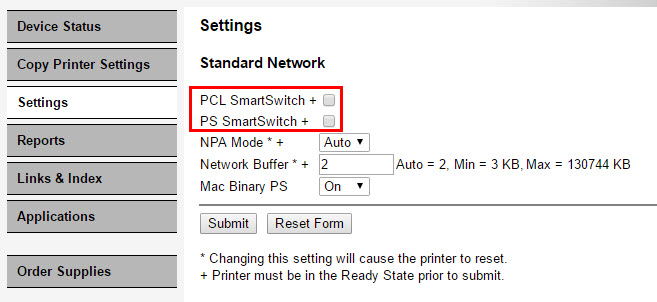
- If the garbage printing continues, access the printer's EWS again and set theMac Binary PSback toAuto,followed by un-checkingPCL SmartswitchandPS Smartswitch, then click onSubmit.
 NOTE:From the printer's EWS, go toSettings>Print Settings>PostScript Menu>Print PS Error. Checking this option will print a PostScript error page if the PostScript emulator is causing the issue.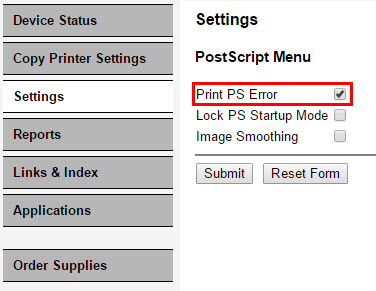
- Should the issue persist, please make sure to coordinate withLexmark 3rd Level supportfor further diagnosis.
LEGACY ID:
SO8242