202.03 paper jam or accordion jam in the fuser
Here are steps to troubleshoot a 202.03 paper jam or accordion jam in the fuser on a Lexmark C950 and X95x.
Issue description
An 'accordion jam' is characterized by a tight folding back and forth of the paper. Accordion jams typically occur in an area of the paper path just beyond the
fuser
unit at the back of the printer. The paper jam error code corresponding to this area is 202.03
.Solution
Removing the jammed paper in the fuser
- If the jammed paper is visible in the exit bin, then firmly grasp the paper on each side, and then gently pull it out.Make sure that all paper fragments are removed.
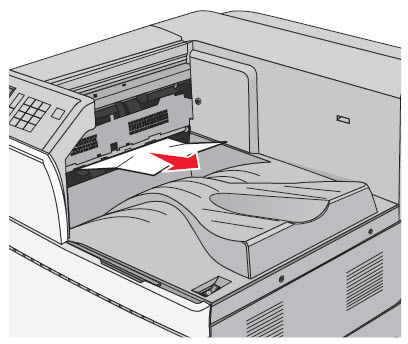
- If you are unable to remove the paper from the exit bin, openDoor Aby lifting the release latch and lowering the door.
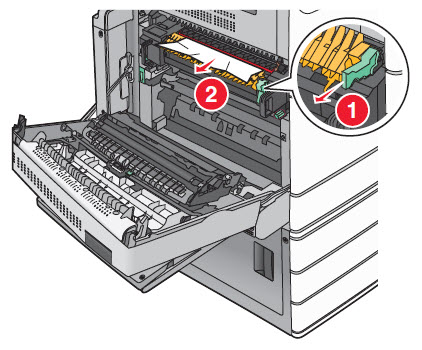
- Pull the green lever down(1). Firmly grasp the jammed paper on each side, and then gently pull it out(2). See the illustration below.Do not touch the center of the fuser unit. Doing so damages the fuser.Make sure that all paper fragments are removed.
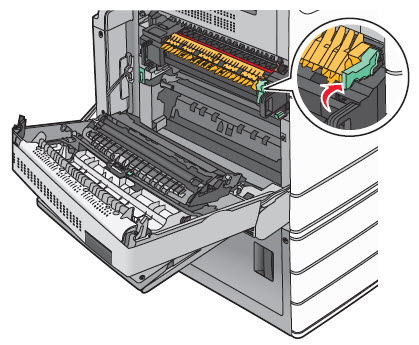
- Push the green lever back into place and closeDoor A.
- If necessary, touchContinuefrom the printer control panel to resume printing.
Avoiding paper jams
- Make sure that the printer supports the paper being used. See “Supported paper sizes, types, and weights” in the printer’sUser’s Guide.
- Check the printer’sPaper Type Settingto ensure it matches the paper type loaded in the tray.
- If the issue persists, contactLexmark Technical Supportfor additional troubleshooting suggestions.
LEGACY ID:
SO6790