TSB: Important firmware update (Base Firmware Level .P615) & instructions for Scan To Network users (October 2017)
Technical Service Bulletin ? Important Firmware Update (Base Firmware Level .P615)&Instructions for Scan To Network Users (October 2017)
Overview
(October 2017)EC6
base
code (.P615)
is now available for the following Lexmark printers and MFPs. Additionally, engine code
(.E600
) is also available for all but the Lexmark C and X 74x series printers and MFPs.Printers:
- Lexmark C746/C748
- Lexmark C792
- Lexmark C925
- Lexmark C950
MFPs:
- Lexmark X548
- Lexmark X746/8
- Lexmark X792
- Lexmark X925
- Lexmark X95x*Series
*
An x
denotes any number within a given model series.Firmware release notes
Printer Model | (.P615) Firmware Release Notes |
C746, 748 | |
X744, 746, 748 | |
X548 | |
C792 | |
X792 | |
C925 and X925 | |
C950 and X95x Series |
Previous EC SNF instructions
NOTE:
Pertains to older versions of SNF.)
Firmware update instructions:
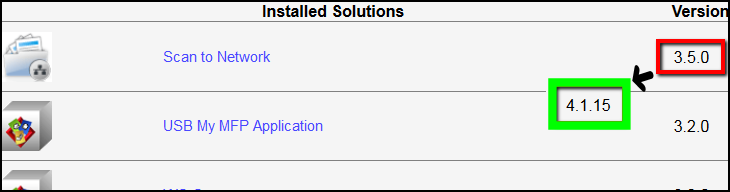
Basic and Premium Scan to Network (SNF app) Users!
Failure to update your version of SNF before updating your printer's base code levels will result in an unusable SNF application with the following observable symptoms:
- The message, “An internal error occurred while processing configuration” displays when you attempt to access the Scan to Network Configuration options.
- The Scan to Network icon fails to appear on the device control panel.
If... | Then... | And then... |
You have SNF version v3.8.4 or older... | First update your version of Scan to Network to v4.1.15 | You can proceed to update your device to base firmware EC3 ( .P440 ). |
You have already updated firmware and lost SNF functionality... | Note: Please contact your sales representative or Lexmark Technical Support. | You will be provided an interim ( .P440 ) firmware package to exclusively address this issue. |
Settings
> Device Solutions
> Solutions (eSF)
LEGACY ID:
TE356