Unable to Get Security Logs in Service Engineer (SE) Menu
Overview
Unlike any other Lexmark devices, the link to download Security Logs is not visible when you access the SE menu of the devices listed above. This document will guide you in a workaround on how to get the security logs from these printers.
Workaround
Step
| Action
|
1
| Install PKI Debug version 3.1.1 .
Notes:
|
2
| Launch the PKI Debug tool and use the following settings:
Then click Apply .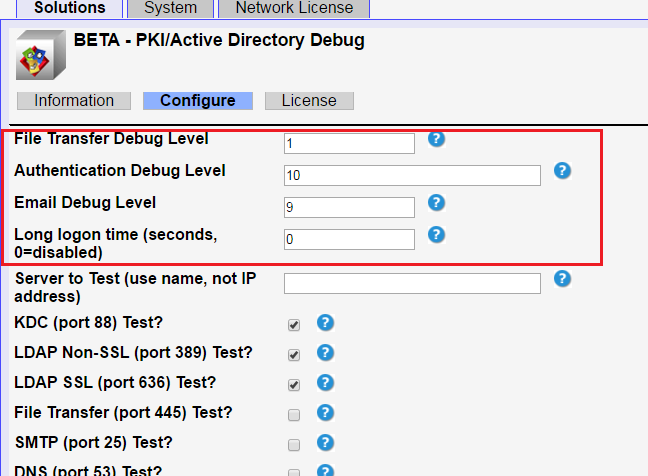 |
3
| Once settings is configured, in the EWS page, go to Applications > PKI/Active Directory Debug > Then select the logs needed.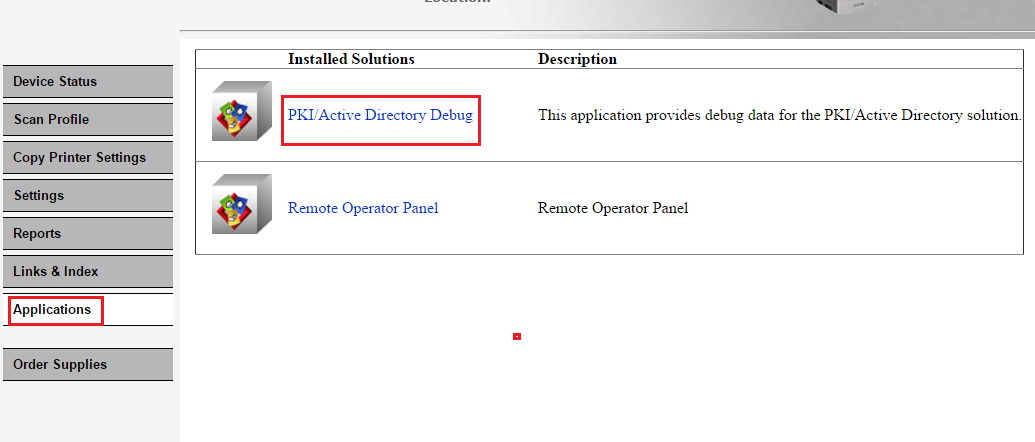
Note: It is recommended to select All Files since it contains all the printer's logs (i.e., LDAP log, Security Log, etc.).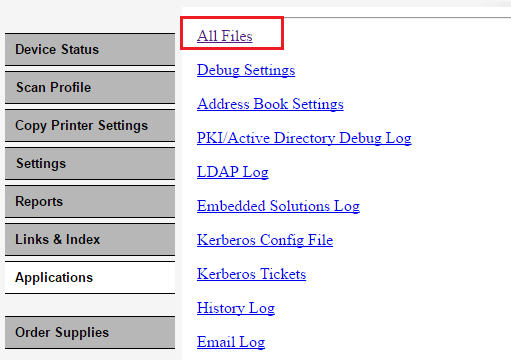 |
Still need help?
If you require additional assistance, please close this window and locate 
Get In Touch with Lexmark!
for contact information.
NOTE:
When calling for support, you will need your printer model
/machine type
and serial number
(SN
).Please be near the products described in this article to expedite the support process and reduce callbacks.
LEGACY ID:
SO7986