Horizontal Lines when Printing from the Lexmark CS310, CS410, CS510, CX310, CX410, and CX510
Overview
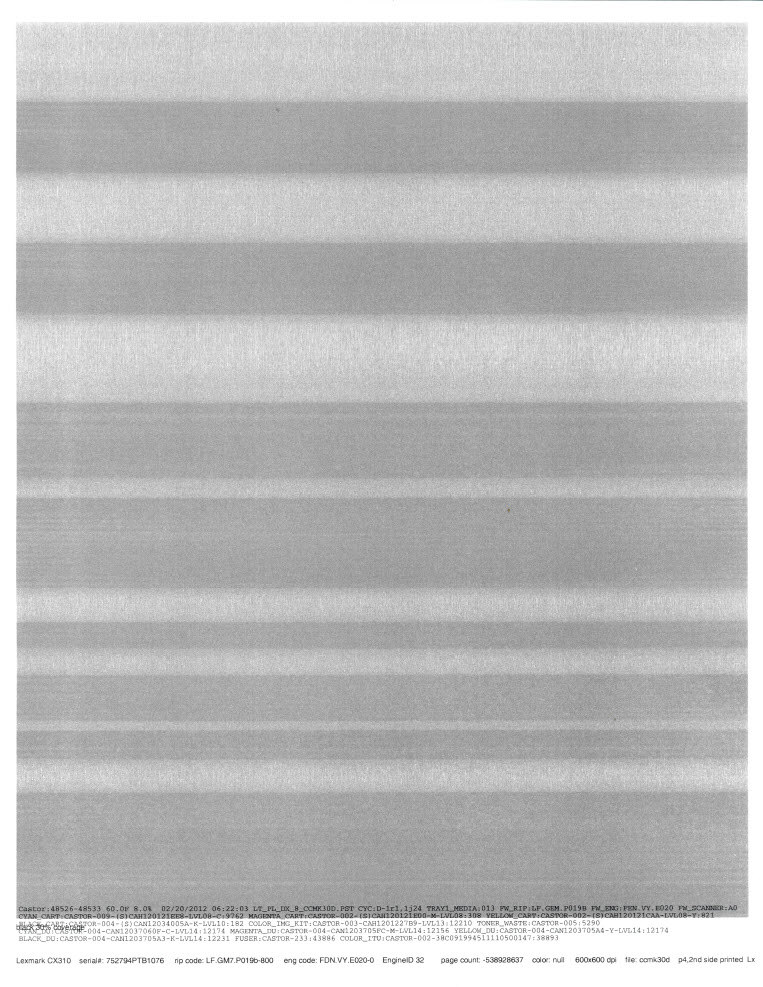
Two or more horizontal lines or bands of toner are appearing on the printed pages, such as those illustrated in the image below. The lines may be darker or lighter in color than the rest of the page. Also the lines or bands will
not
be at a repeating distance apart.
NOTE:
The lines run horizontally across the page, but will appear vertical when you print in landscape mode.
Print Defect Sample
 |
Click Image to Enlarge
|
Troubleshooting
Steps
| Actions
|
1
| In most cases, a defective Photoconductor Unit (PCU ) causes horizontal lines. This is especially true if the streaks are of only one color. Print some sample pages and verify whether the printout has improved. |
2
| Since the PCU is a Customer Replaceable Unit (CRU ), the services of a technician are not required. Try replacing the PCU if you have an extra one in stock. |
3
| If you do not have an extra PCU in stock, or should the issue continue after you have replaced the PCU ,please contact Lexmark Technical Support for additional information and assistance.
Note: If the source of the problem appears to be the PCU , it may be eligible for a warranty replacement; this is dependent, however, on the age and usage of the photoconductor. |
Contacting Lexmark
Please contact
Lexmark Technical Support
if you need additional assistance.
NOTE:
When calling for support, you will be asked for your machine/model type
and serial number
(SN
). If you need help locating your printer's model type
and serial number
, how-to-locate-the-serial-number-tli-config-id-and-.html#how-to-locate-the-serial-number-tli-config-id-and-machine-type-on_HO3870.
Please call from near the printer in case the technician on the phone asks you to perform a task involving the printer.
LEGACY ID:
SO7210