Troubleshooting 203.22 Paper Jam and 149.00 Service Redrive Motor Error
Troubleshooting 203.22 Paper Jam & 149.00 Service Redrive Motor Error
Issue description
Below, an intermittent
203.22 paper jam
with sheets overlapped at the fuser or a 149.00 Service Redrive Motor Error
is shown in the printer.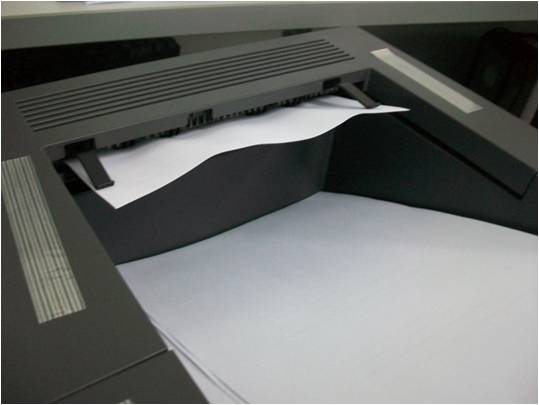 | 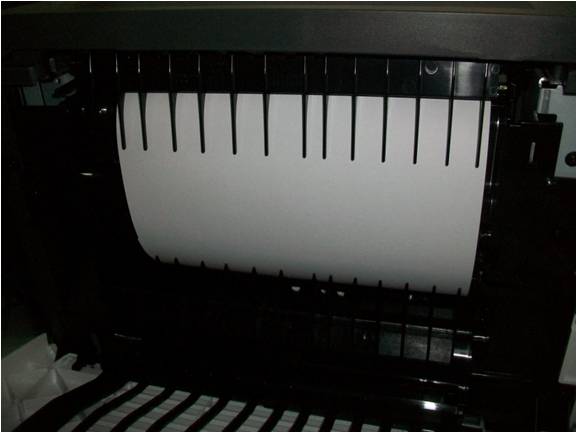 |
Upper-half of a sheet of paper stuck as it exits the printer | Lower-half of the same sheet stuck in the Fuser part and overlapping with another paper |
Solution
Check the Media Type
- Verify whether the printer supports the type of media you are using. See the printer’sUser’s Guidefor more information.
- When printing specialty media; check that it meets all recommendations specified in the printer’sCardstock & Label guide.
- Check the condition of the media.
Check How the media is being Loaded
- Check media level. Make sure the paper trays are not over filled and that the tray guides are set correctly.
- Make sure themedia size & type settingsmatch theactual paper size & typeloaded in the printer.
- Ensure that the media stack's corners are straight; i.e., that the sheets are aligned.
- Check the condition of the media. Make sure its edges are not damaged and that no sheets are locked together.
- Fan the media to make sure no sheets are locked together or that nothing is causing the sheets to stick together.
Check the Printer
Check for any obstruction in the
paper path
, duplex path
, and media tray pass through
areas. Clear the obstruction if one exists.Check the condition of the
pick roll
and separator roller
. Clean the rollers if necessary. Also check the paper tray for any signs of damage.Should any of the rollers be worn out or if the paper tray shows signs of damage, contact Lexmark Technical Support for further assistance.
LEGACY ID:
TE522