Lexmark MX511de ? The Fax Icon Does Not Show on the Home Screen
What you will see
The fax icon is
not
available on the home screen of a Lexmark MX511de
printer.
NOTE:
The following settings are true in this scenario:- The “Fax settings” which is found on the printer control panel>
 Settingsis already set toAnalog.
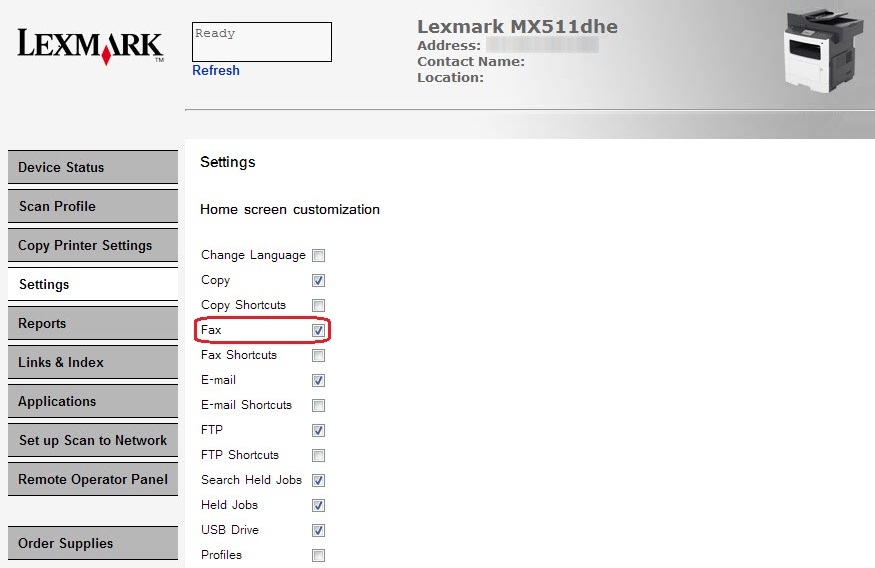
 - TheFax functionisenabledunderEmbedded Web Server(EWS) >Settings>General Settings>Home screen customization.
 |
Click Image to Enlarge
|
Recommended solution
Restore the fax function
following the steps provided below:Step
| Action
|
1
| On printer Control Panel, press *411 . |
2
| Select item number three (3) Fax settings . |
3
| Select item number six (6) Reset Fax settings . |
4
| Select item number three (3) All fax user and modem settings . |
5
| Reboot the printer. |
Still need help?
Please contact
Lexmark Technical Support
if you need additional assistance.
NOTE:
When calling for support, you will be asked for your machine/model type
and serial number
(SN
).Please call from near the printer in case the technician on the phone asks you to perform a task involving the printer.
LEGACY ID:
SO7460