Lexmark MS911 & MX91x ? Printer Posts ?243.36 Paper Jam on Door D? when Printing from Tray 3
What you will see
The printer posts “243.36 Paper Jam on Door D” when trying to print from the 2500 sheet option tray (Tray 3). Checking Door D shows no signs of paper being stuck in the paper path.
Possible cause
There are several factors that might result in this error, but one possibility is that the two-pin interface cable of the 2500-sheet option tray has become disconnected or loose.
Click Image to Enlarge
|
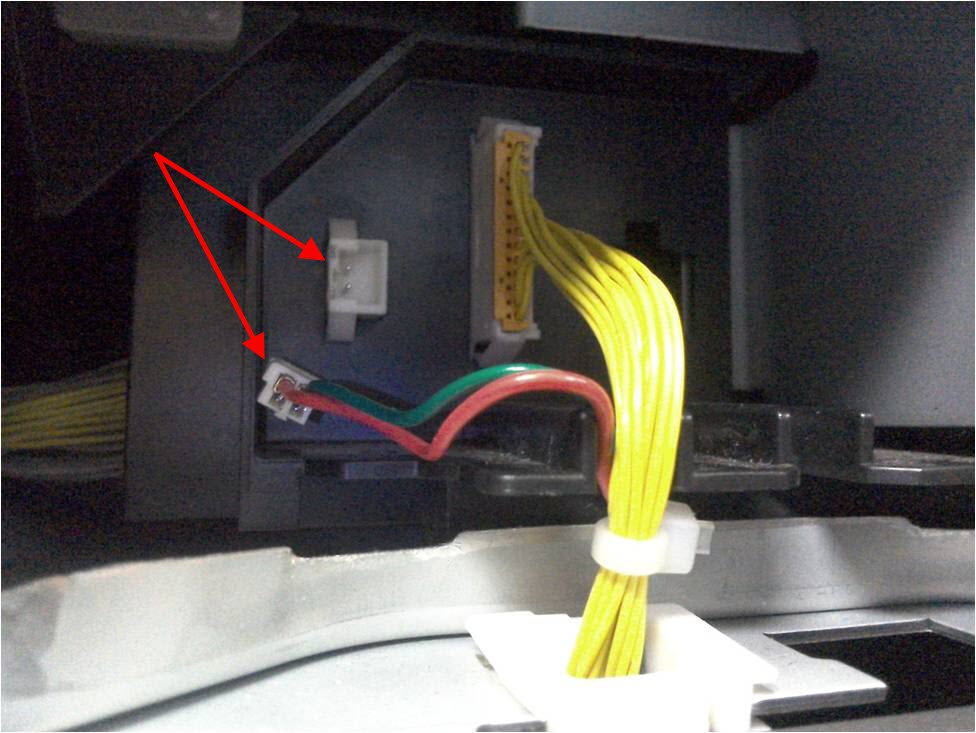 |
Disconnected or loose two-pin interface cable can cause the printer to post a 243.36 Paper Jam. |
Suggested Remedy
- Ensure no media is stuck anywhere in the paper path.
- Check the two-pin interface cable found at the back of the printer. This is the cable that connects the printer and the 2500-sheet option tray.
- Make sure that the cable is not disconnected or loose. Reseat the cable if necessary.
- Restart the printer and see whether the error re-appears. If error persists, please contact Lexmark Technical Support for additional troubleshooting suggestions.
Still need help?
If you require additional assistance, please close this window and locate 
Get In Touch with Lexmark!
for contact information.
NOTE:
When calling for support, you will need your printer model
/machine type
and serial number
(SN
). Should you need help locating these, serial-number-machine-type-and-configuration-id-lo.html#serial-number-machine-type-and-configuration-id-location-for_HO3937.Please be near the products described in this article to expedite the support process and reduce callbacks.
LEGACY ID:
SO7590