Lexmark MS/MX 310, 410, 510, & 61x ? How to Identify and Repair a Re-Drive Exit Shaft Noise
Lexmark MS/MX 310, 410, 510, & 61x ? How to Identify and Repair a Re-Drive Exit Shaft Noise
Overview
The printer produces a clicking noise from the paper exit area. Play the sample audio file below and compare it to the sound produced by your printer. Is it same kind of noise?
Type of noise
| Click the Play button
|
Clicking sound |
NOTES:
- You needQuickTimeto be able to play the audio file. Click the button http://www.apple.com/quicktime/download/ to download QuickTime now.
- A pop up message might appear saying: QuickTime Player needs your permission to run. Click "Always run on this site."
Recommended solution
This type of noise requires replacement of the
Re-drive Exit Shaft
. Please contact Lexmark Technical Support
to set up service for the printer. Contacting Lexmark
If you require additional assistance, please close this window and locate
Get In Touch with Lexmark!
for contact information.
NOTE:
When calling for support, you will need your printer model
/machine type
and serial number
(SN
). If you need help locating these .Please be near the products described in this article to expedite the support process and reduce callbacks.
LEGACY ID:
TE569
Technical Service Bulletin
| Problem Description
| |
Machine Type/Model
| 4514 - xxx 7015 - xxx 7016 - xxx | Noisy Re-drive Exit Shaft Solution Check whether the re-drive exit roller shaft is warped. Replace it if necessary using P/N: 40X8850. |
Date Created
| 10/03/2013 | |
Last Updated
| 10/05/2013 | |
Safety Issue?
| No | |
Code Update?
| No | |
Engineering Change?
| No | |
New Parts?
| No | |
Old Parts Status
| n/a | |
Voltage: 120/240
| All | |
Serial No. Range
| All |
Click Images to Enlarge
| |
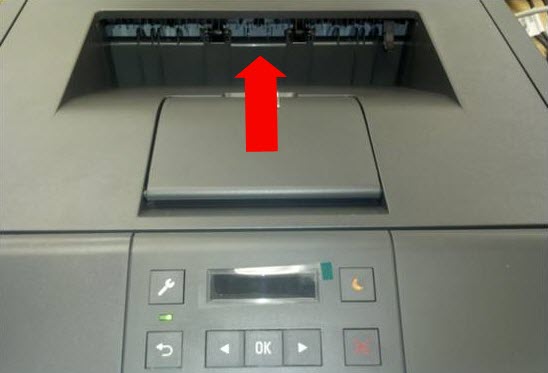 | 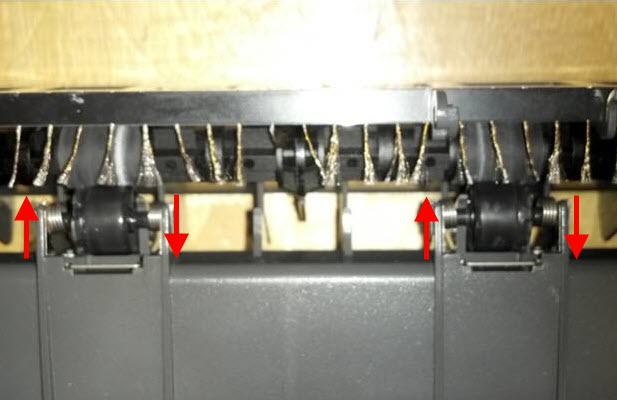 |
Location of exit shaft and rollers | Over 1 mm (0.04”) movement of idler rollers can cause noise. |