Counting the page usage and checking the page balance
How to count page usage and check page balance
Issue description
This article explains the criteria on how printed pages are counted and details the steps on how to determine page balance.
Method of Counting
- Pages‑ refer to printed side per color plane. See the equivalent page count deducted for each printed page below.
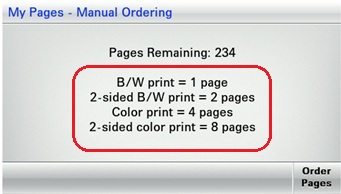
- Colorprinting decreases page balance byfourper page.
- Two-sidedprinting decreases page balance bytwoper page.
- Black-and-whiteprinting decreases page balance byoneper page.
How to check page balance
- From the printer home screen, touch the My Pages application icon.The number ofPages Remainingappears on the first screen.
- If manual ordering is configured, then touchOrder Pagesto order a page bundle, or touchBackto return to the home screen.
LEGACY ID:
HO3898