Full page background or gray print
Full page background or gray print
Issue description
The print appears to have a gray background or haze across and down the full page. In some areas, the text might appear to repeat or have shadows that repeat on what should be white areas of the page. See example below:
 |  |
Full Page Background or Gray Print - With Border
| Full Page Background or Gray Print - No Border
|
Possible Cause
Poor contact to the photoconductor is the most likely source of a full page background defect. Check the right-hand side of the imaging unit for any material that could be preventing good contact to the contact spring inside the printer. Remove any debris or material found and reinstall the imaging unit. If the defect still persists, turn the printer off and back on to recalibrate the settings.
Non-genuine Lexmark Supplies / Refilled Cartridges / ‘Compatible’ Supplies
Use of
Non-Lexmark
supplies can result in damage to printer components and in multiple failures, including degraded print quality within the system; i.e., the effects of using such non-Lexmark supplies are not limited to the imaging unit, printhead, fuser, transfer system, and paper feed reliability.
Contacting Lexmark
If you require additional assistance, please close this window and locate
Get In Touch with Lexmark!
for contact information.
NOTE:
When calling for support, you will need your printer model
/machine type
and serial number
(SN
). Should you need help locating these.Please be near the products described in this article to expedite the support process and reduce callbacks.
LEGACY ID:
SO8163
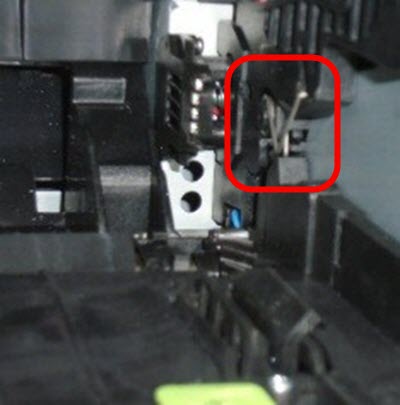 | 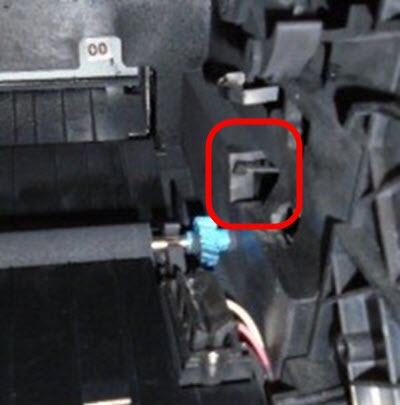 |
MS/MX31x/41x/51x/61x
| MS/MX71x/81x
|
Step
| Action
|
1
| Most likely failure is an older Imaging Unit Serial Number that has a 12 , 13 , or 14 in the 4th and 5th place (CAS12xxxxxxx ); the recommendation is to ship a new imaging unit.
|
2
| If the defect looks the same after immediately replacing and imaging unit, check the PC Drum contact in the printer to see whether it is bent and/or in correct contact with the HVPS . If a PC drum core contact failure occurred, it would lead to the full page being covered with an even gray background, not repeating patterns on a portion of the page.
|
3
| Replace the Laser scanning unit / Laser printhead if the print quality issue is still present.
|
4 | Should issue persist, please escalate to Lexmark 3rd Level Support . |