Lexmark MS310, MS410, MS510, MS610, MX310, MX410, MX510, MX510, MX610, & MX611 Printer/MFP ? Front Access Door Is Difficult to Close when Pushed from the Left Side
Lexmark MS310, MS410, MS510, MS610, MX310, MX410, MX510, MX510, MX610, & MX611 Printer/MFP ? Front Access Door Is Difficult to Close when Pushed from the Left Side
Overview
The printer's front access door may not close completely if pushed only from the left side (see sample below). If this is the case, the printer will not go into
Ready
mode.Click Image to Enlarge
|
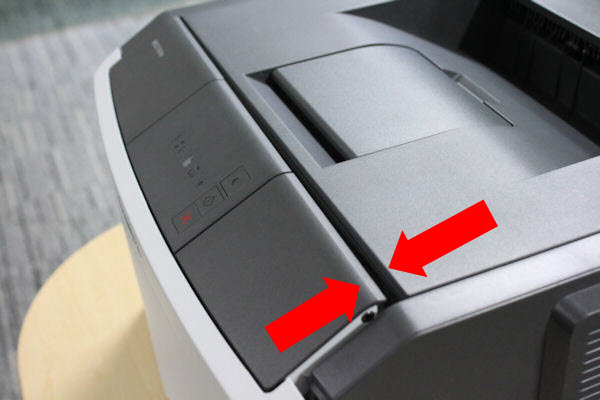 |
Notice the difference in the gap on the left and right-hand sides of the front door cover if it is not closed completely. |
Recommendation
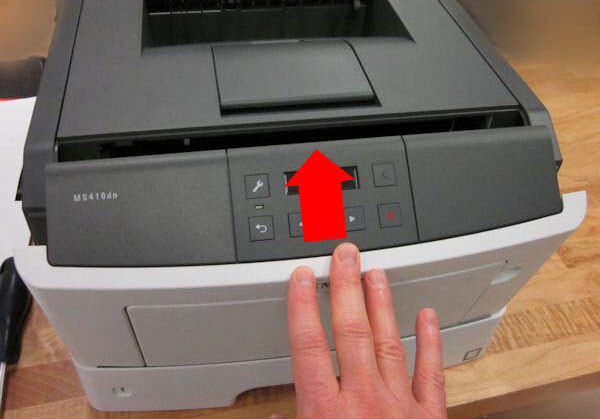
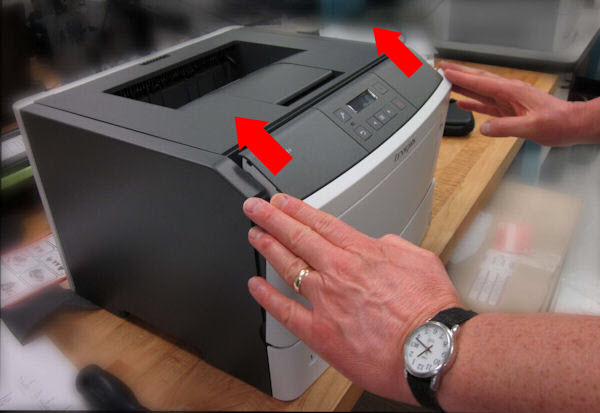
The front door should be closed by pushing on both the left and the right-hand sides of the door at the same time, or on its center, as shown in the images below.
Click Image to Enlarge
| |
 |  |
Still need help?
Please contact Lexmark Technical Support if you need additional assistance.
NOTE:
When calling for support, you will be asked for your machine/model type
and serial number
(SN
). If you need help locating thesePlease call from near the printer in case the technician on the phone asks you to perform a task involving the printer.
LEGACY ID:
FA908