Lexmark CX/CS8xx and XC/Cxxxx: How to Locate the Printer Supplies Serial Numbers and Part Numbers
Affected Products:
Single-Function: CS820, CS827 and C6160
Multifunction: CX820, CX825, CX827, CX860, XC6152, XC6153, XC8155, XC8160 and XC8163
Issue Description:
When contacting
Lexmark Technical Support
or arranging warranty replacement for supplies-related issues, you will need to know the Serial Number
(SN
) and Part Number
(PN
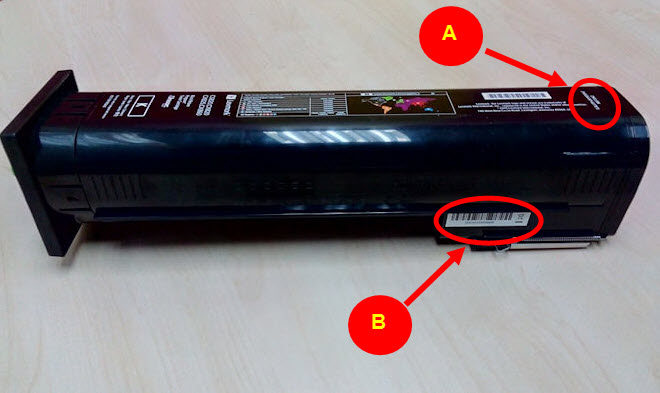
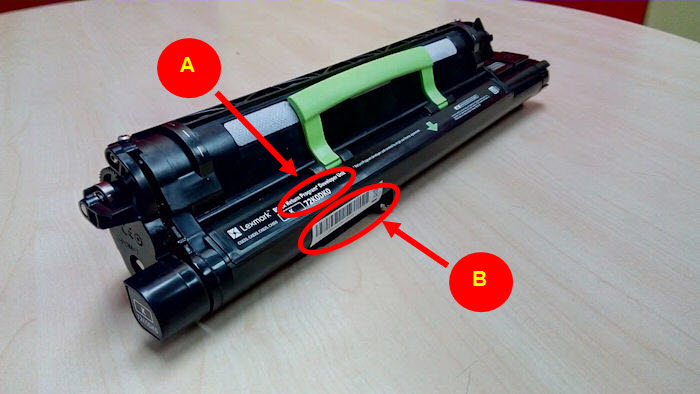
) of the supplies in question. This article explains how to find this information on the Toner cartridge
, Photoconductor Unit
(PCU
), and Developer Unit
(DU
).
Locating the Label:
Refer to the locations the
red
arrow points to in the right-hand images below.
Toner Cartridge
|  |
Developer Unit (DU)
|  |
Photoconductor Unit (PCU)
| 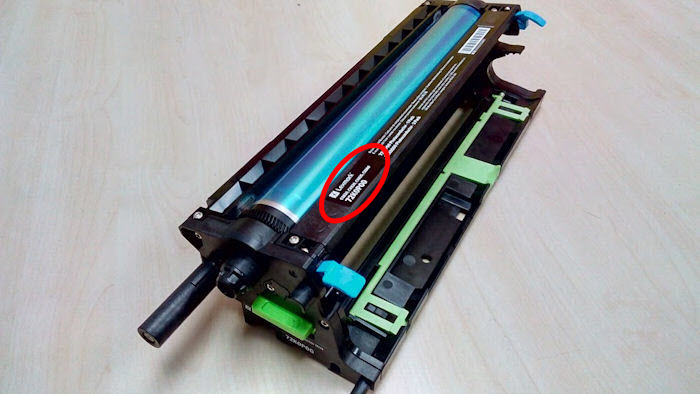 Image A 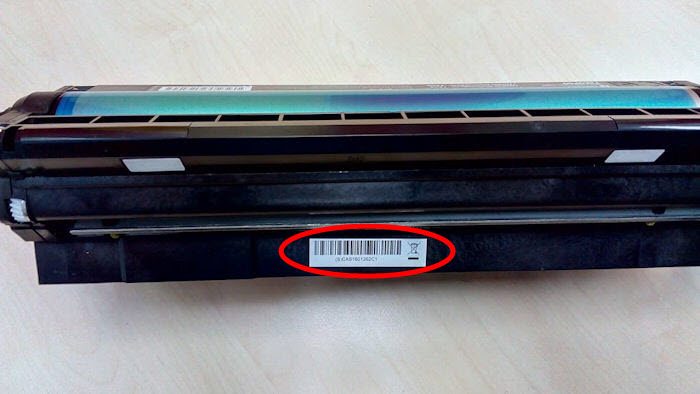 Image B |
Still Need Help?
Have the following available when calling Lexmark Technical Support;
- Printer model(s)
- Printer serial number
- Toner/imaging unit/waste toner bottle part number and serial number
LEGACY ID:
HO4011