Startup Error Code 900.52
900.52 Boot up error, 900 error code when starting up the printer, Printer unable to start in normal state.
Issue description
The printer is displaying error code 900.52. This error code is related to a problem with the video display system on the printer. A technical error occurred while processing the screen display, which requires a restart or further technical support.
Solution
- Restart the Printer
- Turn the printer off and back on. This step often clears temporary errors.
- Check for Firmware Updates
- Make sure that your printer is running the latest firmware. Updating may fix the issue if the fix is addressed in a newer version.
- See Driver & downloads for more information.
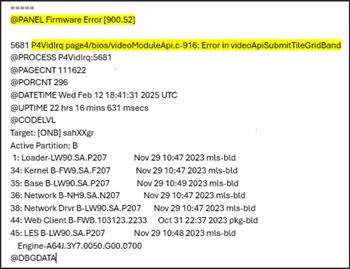
- Take a Photo of the Error
- If the error reappears, take a clear photo of the printer screen showing the error code and details.
- Collect Printer Logs (if needed)
- If a photo is not possible, gather the history logs from the printer. This helps confirm the exact error codes for further troubleshooting. Here is a sample screenshot of the history logs with the error code.
- If the issue persists, then contact customer support.