Unable to connect to the wireless network using the MarkNet N8350 / N8360 / N8370
Unable to Connect to the Wireless Network when Using the MarkNet N8350 / N8360 / N8370
Issue description
- Unable to connect to the wireless network when using theMarkNet N8350orMarkNet N8360wireless cards with a printer firmware level xxxxx.070.yyy or later.
- The wireless connection is lost after updatingprinter firmware to version xxxxx.070.yyy or later.
- The printer also stays in "Standard Network" mode when installed without an Ethernet cable connection present.
- The wireless card will not show up as an installed option onPrinter Settingspages.
- The warning message “Unsupported USB device, please remove” appears on top of the control panel.
Solution
- Power the printerOfffor one minute and power it backOn.
- If the issue is not resolved proceed toStep 2.
- Check on the type of wireless card installed in the printer.Please refer to the Additional Information for the wireless card model type.
- If the wireless card model is a MarkNet N8350 or Marknet N8360, proceed to contact Lexmark Technical support.
- If the model is MarkNet N8370, proceed toStep 3.
- Check the wireless card and wireless router:
- Ensure the wireless card is configured with theSSID(Wi-Fi network name) and password that matches the wireless router/access point.
- Make sure wireless router is working and other wireless devices such as laptop/phone can connect to it.
- Restart the wireless router.
Additional information
Make sure to check the wireless card model type as provided in the pictures below.
MarkNet N8350 and MarkNet N8360
These wireless models are easily identified by the rubber antenna sticking up outside of the printer.
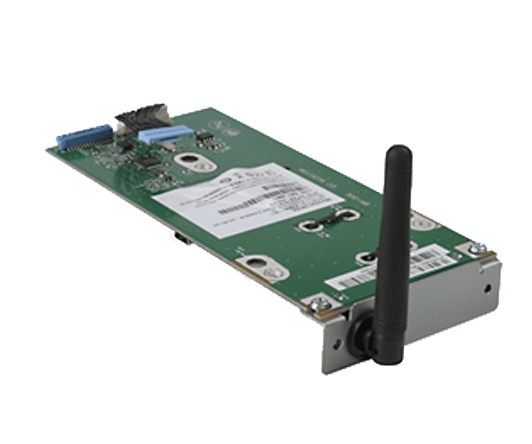
- Installation #1:
- Printers with wireless cards that installs directly into the card cage (CS82x, CX82x, C6160, XC6152, XC8155, XC8160).
- Installation #2:
- Printers requiring a “backpack” for mounting (CS72x, C4150, CX72x, XC4140, XC4150).
MarkNet N8370
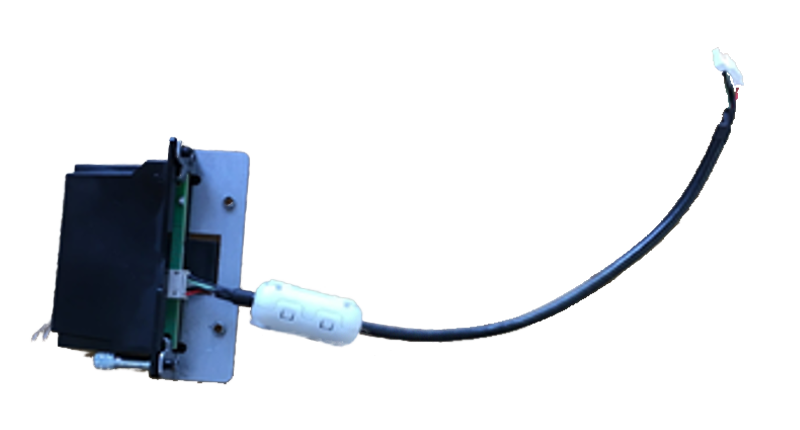
- Installation #1:
- Printers with wireless cards that installs directly into the card cage (CS82x, CX82x, C6160, XC6152, XC8155, XC8160).
- Installation #2:
- Printers requiring a “backpack” for mounting (CS72x, C4150, CX72x, XC4140, XC4150).
LEGACY ID:
SO8858