912.81 error code on a Lexmark devices with RFID option tray installed
Lexmark CX/CS72x and XC/C41xx: 912.81 Error Code on a Lexmark Devices with RFID Option Tray Installed
Affected Products:
Single-Function: CS720, CS725, CS727, CS728 and C4150
Multifunction: CX725, CX727, XC4140, XC4143, XC4150 and XC4153
Issue Description:
When powering the printer
On
, it displays the 912.81 error code
on the home screen.
Solution:
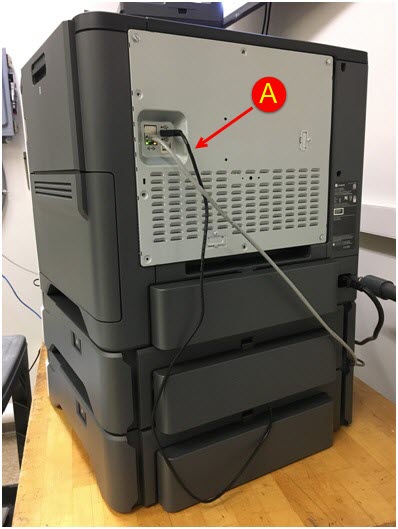
- Make sure that the USB cable from theRFID option cableis plugged into the USB port at the back of the printer.
- If the cable is unplugged, powerOffthe printer, plug the RFID option cable into the USB port and power it backOn.(A)USB cable from RFID Option tray connected to the USB printer's port
Still Need Help?
Have the following available when calling Lexmark Technical Support;
- Printer model(s)
- Printer serial number
LEGACY ID:
SO8347