CAC users are unable to perform authentication
Common Access Card (CAC) users encounter issues when authenticating on the printer. 90Meter, inc. CAC Reader issue, unable to authenticate using CAC, cac reader, cac reader not working.
Issue description
The printer fails to authenticate when both the Smartcard NIPRNet license and the PIV Smartcard driver are installed.
Determining whether the printer has a NIPRNet or SIPRNet license
- Open a web browser, and then type the printer IP address in the address field.
- If necessary, log in as an administrator.
- View the printer IP address on the printer home screen. The IP address appears as four sets of numbers separated by periods, such as 123.123.123.123.
- If you are using a proxy server, then temporarily disable it to load the web page correctly.
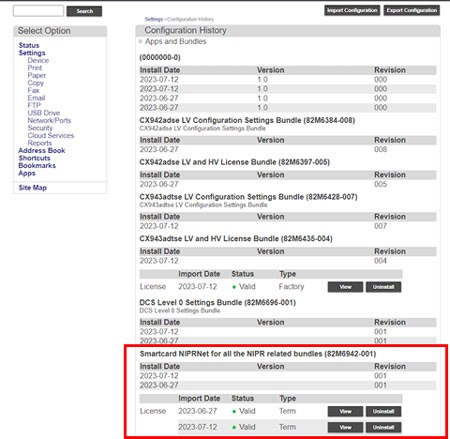
- SelectSettings>Configuration History.
- Look for theSmartcard NIPRNetorSmartcard SIPRNETlicense.
Determining if the printer has a PIV driver:
- Open a web browser, and then type the printer IP address in the address field.
- If necessary, log in as an administrator.
- View the printer IP address on the printer home screen. The IP address appears as four sets of numbers separated by periods, such as 123.123.123.123.
- If you are using a proxy server, then temporarily disable it to load the web page correctly.
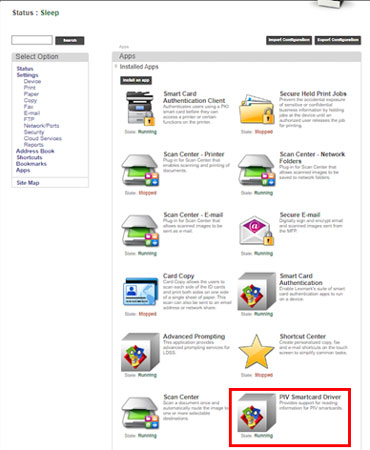
- ClickApps.
- Look for thePIV Smartcard Driver.
Solution
Uninstall the PIV Smartcard driver.
- Click the PIV Smartcard Driver icon, and then selectUninstall.
- Restart the printer.