Installing the spring retainer
Learn how to install the spring retainer into your printer.
Spring retainer installation procedure
This article shows you how to install the spring retainer into your printer.
Depending on the model, the appearance of your printer may vary.
- Turn off the printer.
- Unplug the power cord from the electrical outlet and the printer.
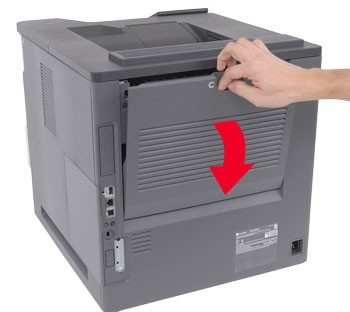
- Open door C.To reduce the risk of injury from a hot surface, allow the surface to cool before touching it. It may take up to 30 minutes for the surface to cool.
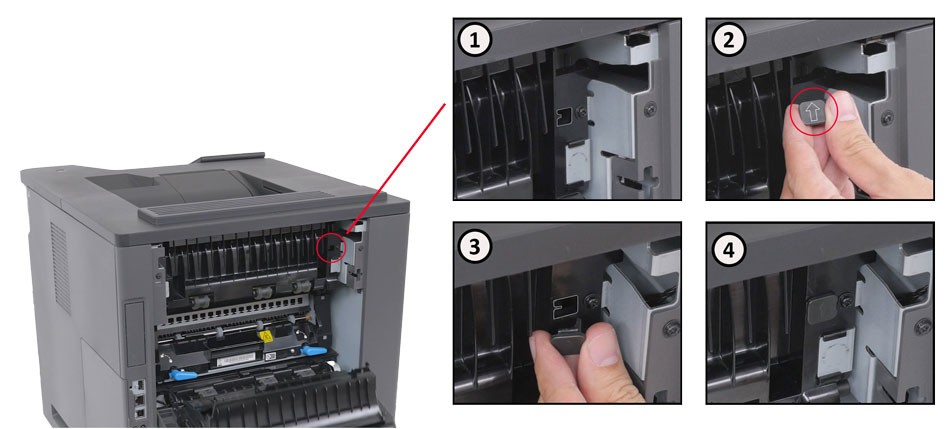
- With the arrow pointing up, insert the spring retainer until it clicks into place.
- Close door C.
- Connect one end of the power cord to the printer.To avoid the risk of fire or electrical shock, connect the power cord to an appropriately rated and properly grounded electrical outlet that is near the product and easily accessible.
- Turn on the printer.
Service parts
Before ordering, make sure to validate these service part numbers at the
Lexmark Parts Store
.- Spring retainer -41X6155
Additional information
For more information regarding the spring retainer installation, refer to the following video: