Plugging the printer to either 110 or 220 outlet / voltage line
Lexmark CX/CSx31, MC/Cxxxx and XC/C2326: Can I Plug the Printer to Either 110 or 220 Outlet / Voltage Line
Overview
The printer has a dedicated, non-switchable Low Voltage Power Supply (
LVPS
) module; either 110 or 220 volts. Hence, when plugging the printer to a wall outlet, the input voltage line must match the printer LVPS type.
Affected Products
- Single-Function: CS331, CS431, C2326, C3224, C3326 and C3426
- Multifunction: CX331, CX431, MC3224, MC3326, MC3426 and XC2326
Identifying LVPS Type
Check the following to know the printer LVPS type:
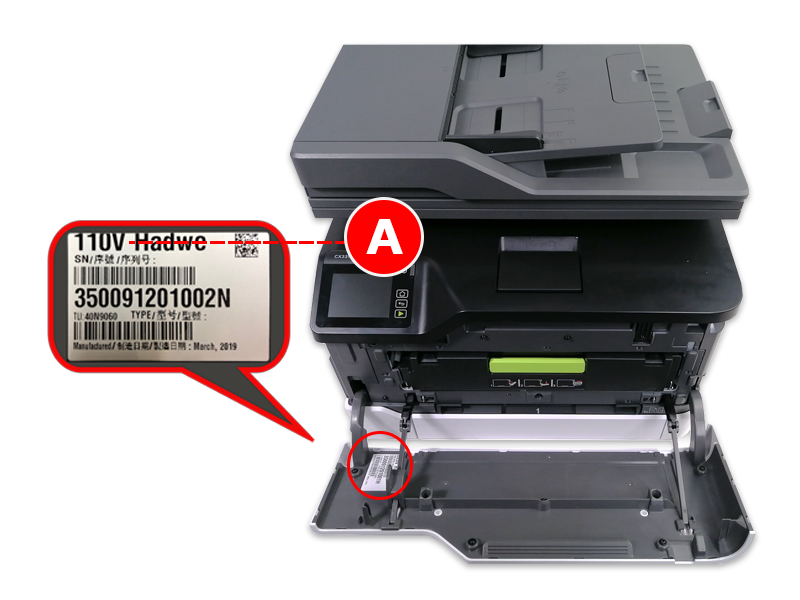
- Printer label (A)
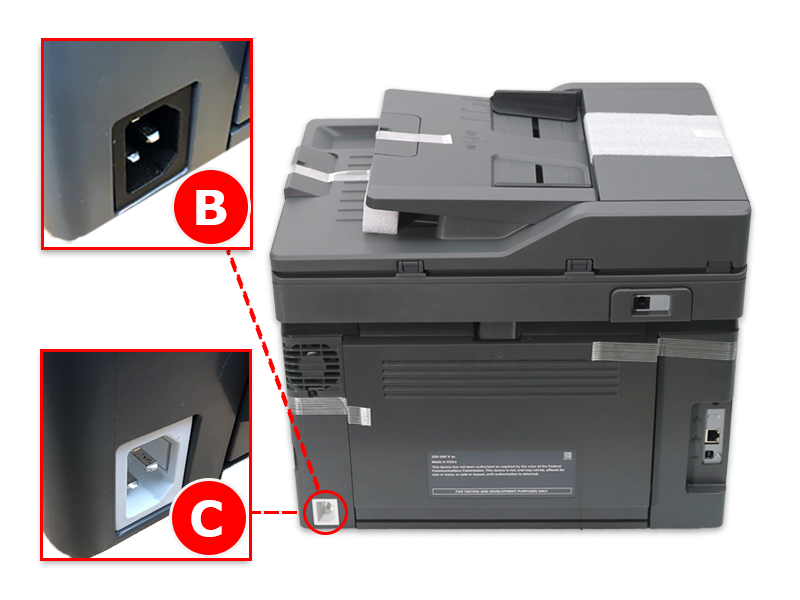
- Exterior color of the AC inlet housing of the power supply port at the back of the printer.
- Black for 110 volts (B)
- White for 220 volts (C)
 |  |
LEGACY ID:
FA1291