Troubleshooting vertical streaks
Troubleshooting print quality defect vertical streaks
Issue description
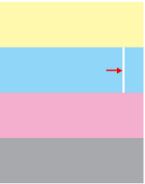
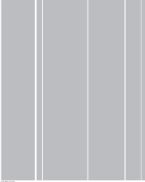
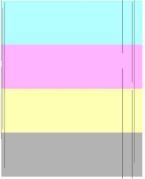
Visible dark or light vertical lines, streaks, or voids appear on the paper.
Review the following print defect samples for examples of the dark and light vertical lines.
Light vertical lines | |
 |  |
Dark vertical lines | |
 |
Solution
- Did this occur during printing or scanning/copying?
- For scanning/copying, please refer to KB article “Vertical lines appear when using the ADF “.
- For printing, proceed with the following steps.
- Print the following printer internal pages. (User's Guide provides instructions for navigating through the printer menus.)
- Print Defects Guide
- Menu Settings Page
- Check the levels of the consumable supplies on theMenu Settings Page(User's Guide provides instructions for replacing supplies).
- If the supply levels are normal, please refer to KB topic “Cleaning the printhead lens“.
- Using thePrint Defect Guide, check to see;
- If the vertical lines appear in one color, replace the affecteddeveloper unitand order thephotoconductor unit.
- If the vertical lines appear across multiple colors, replace theImaging Kit.
LEGACY ID:
SO7193