Article de support pour Lexmark X264
Vertical lines appear when using the ADF
Issue description
The most common scan quality issue is the appearance of a solid line down the page when performing scans using the Automatic Document Feeder (ADF). This article provides some easy diagnostic steps and remedy suggestions.
Note: This is seldom a scanner hardware failure.
Single or multiple points of contamination on the ADF glass leads to a continuous solid line down all pages that are fed through the ADF.
Why? The optical sensor interprets single marks (points) and debris as lines when the entire length of page passes over them.
 |
| Printed or Scanned Page Illustration |
Who's this for?
All users of Lexmark MFPs or All-In-One inkjet printers;
| If... | And, it affects all... | But... |
|---|---|---|
Vertical lines on output with pages fed through the Automatic Document Feeder (ADF)... | Scan jobs (e-mail, ftp, solutions, fax)... | Normal and expected output when the page is placed on the scanner's flatbed. |
What happens?
Think of it this way:
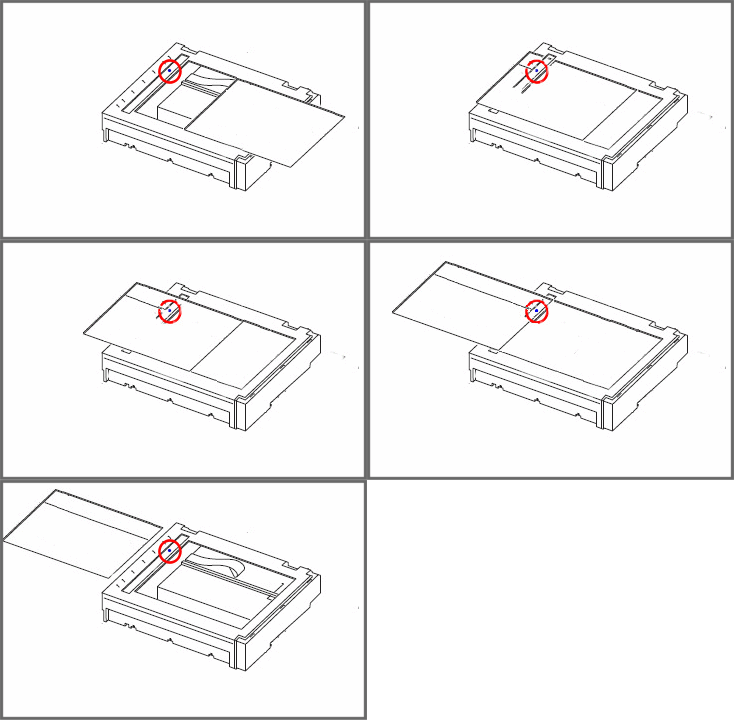
- The page is pulled from the ADF.
- The moving page slides across an ADF-designated portion of glass.
- The image sensor, which is located under the glass, reads and interprets the moving page's contents.
- Contamination on this ADF glass is seen by the image sensor for the entire length of the page.
- The image processor interprets the image sensor's repeated capture of this contamination as a vertical solid line.
- Any ADF scan function now exhibits a vertical line.
Solution
Suggested diagnosis and fix
Locate the portion of the glass designated for ADF scans.
Note: The glass location differs by model. This area is often separate from the scanner flatbed. Please reference
User's Guide for more information if you are having a difficult time locating this designated area.Perform a visual inspection for any of the following recurring culprits:
- Clear adhesive tape
- Glue
- Ink pen
- Paper
- Marker
- White out
- Staples
- Environmental dust or dirt
Note: Ink marks can be especially hard to see and almost translucent at first sight. However, the image sensor (CCD) registers them as a mark.
Use a clean, soft, moistened cloth to thoroughly clean and remove any marks or debris.
Inspect the underbelly or underside of the ADF for any marks or debris.
Perform another scan to see whether cleaning the glass alleviated the issue.
Repeat the procedure should a vertical line still appear.
Note: Printing and scanning from the scanner flatbed work fine.
This time, place an intentional mark on a blank sheet of paper and take note of its location. Now place that sheet of paper in the ADF and make a copy.
Evaluate the distance of the vertical line to the your mark.
Inspect that area of the glass for further debris or marks and clean as necessary.

Other possibilities
| If... | Then... |
|---|---|
Vertical lines appear only when printing... | Consider other printer-related topics such as toner cartridge, charge roll, photoconductor, transfer roll, or fuser. |
Vertical lines appear when you lay the page on the flatbed... | Consider other printer-related topics such as toner cartridge, charge roll, photoconductor, transfer roll, or fuser. |
Vertical lines appear on ADF-fed printed copies, but they do not appear on scan-to-network [e-mail, FTP, folder (PC), solutions]... | Consider other printer-related topics such as toner cartridge, charge roll, photoconductor, transfer roll, or fuser. |
LEGACY ID: SO5152
Noter cet article
Vos commentaires sont les bienvenus. Les commentaires nous aident à identifier les contenus qui doivent être actualisés pour plus de précision ou de fidélité.
Merci de votre commentaire!