Article de support pour Lexmark C950
202.03 paper jam or accordion jam in the fuser
Issue description
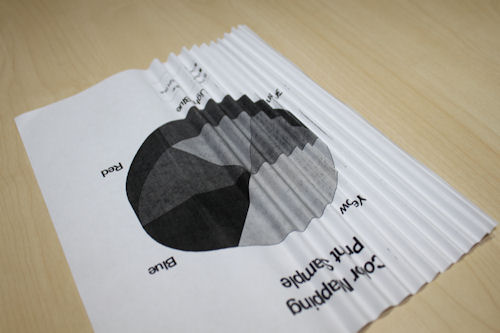
An 'accordion jam' is characterized by a tight folding back and forth of the paper. Accordion jams typically occur in an area of the paper path just beyond the fuser unit at the back of the printer. The paper jam error code corresponding to this area is 202.03.
Solution
Removing the jammed paper in the fuser
If the jammed paper is visible in the exit bin, then firmly grasp the paper on each side, and then gently pull it out.
Note: Make sure that all paper fragments are removed.
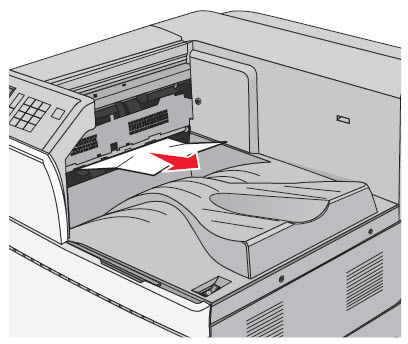
If you are unable to remove the paper from the exit bin, open Door A by lifting the release latch and lowering the door.
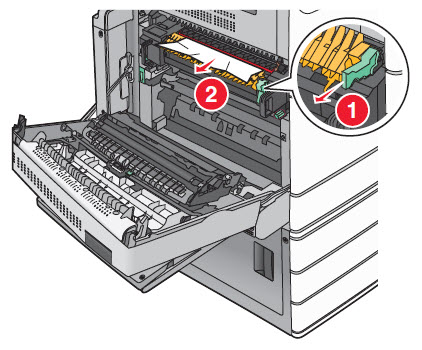
Pull the green lever down (1). Firmly grasp the jammed paper on each side, and then gently pull it out (2). See the illustration below.
Warning—Potential Damage: Do not touch the center of the fuser unit. Doing so damages the fuser.
Note: Make sure that all paper fragments are removed.
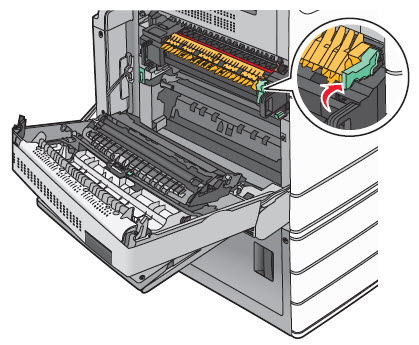
Push the green lever back into place and close Door A.
If necessary, touch Continue from the printer control panel to resume printing.

Avoiding paper jams
- Make sure that the printer supports the paper being used. See “Supported paper sizes, types, and weights” in the printer’s User’s Guide.
- Check the printer’s Paper Type Setting to ensure it matches the paper type loaded in the tray.
- If the issue persists, contact Lexmark Technical Support for additional troubleshooting suggestions.
LEGACY ID: SO6790
Noter cet article
Vos commentaires sont les bienvenus. Les commentaires nous aident à identifier les contenus qui doivent être actualisés pour plus de précision ou de fidélité.
Merci de votre commentaire!